Independent tools for live creators
Stay in
your flow.
Less window juggling. More live creating. Eight open-source tools that put OBS, Twitch and YouTube within reach.
Your desktop. Your terminal. Your phone.
Switch a scene
Example audio levels
Mic/Aux−6.1 dB
Desktop−12.4 dB
$ obsctl scene Gameplay
Preview scene: Gameplay. This demo does not connect to OBS.
Try the scene buttons. No OBS connection needed.
Meet SceneDeck for Android
Your spare screen.
Your control room.
Give your phone a place in the setup. Switch scenes, mix audio and check stream health without reaching for another window.
Explore the Android remote
Android 9+OBS 28+Phone & tablet
Real app. Real
control.Connect over your local network.
A place for every tool.
Keep the encoding on your rig. Keep the controls at your fingertips. OBS WebSocket keeps your controls connected.
Workstation & Android
Phone or tablet · OBS controls
WebSocket 5.x
Streaming rig
Stream
Destinations
Chat & broadcast setup · direct to platforms
daemon + TUI + CLI · Rust
obsctl-rs
Your OBS command center. Daemon, TUI and CLI.
workstation → remote OBS → telemetry back
One machine works, too. Connect the OBS tools to
127.0.0.1:4455. On Android, use your OBS computer’s local
network address instead. Chat and broadcast setup talk directly to the
platforms.
Build your own setup.
Each tool does one job well. Take the whole toolkit, or just the piece your setup is missing.
SceneDeck Android An Android OBS remote with a scene deck, audio mixer, stream controls and live stats. Kotlin View installation
Turn your Android phone or tablet into an OBS Studio control deck. OBS runs on your computer; SceneDeck controls it over WebSocket. Available as an APK from GitHub releases.
GITHUB RELEASE — ANDROID APK
Download Android APK ↗GitHub releases are the current installation source.
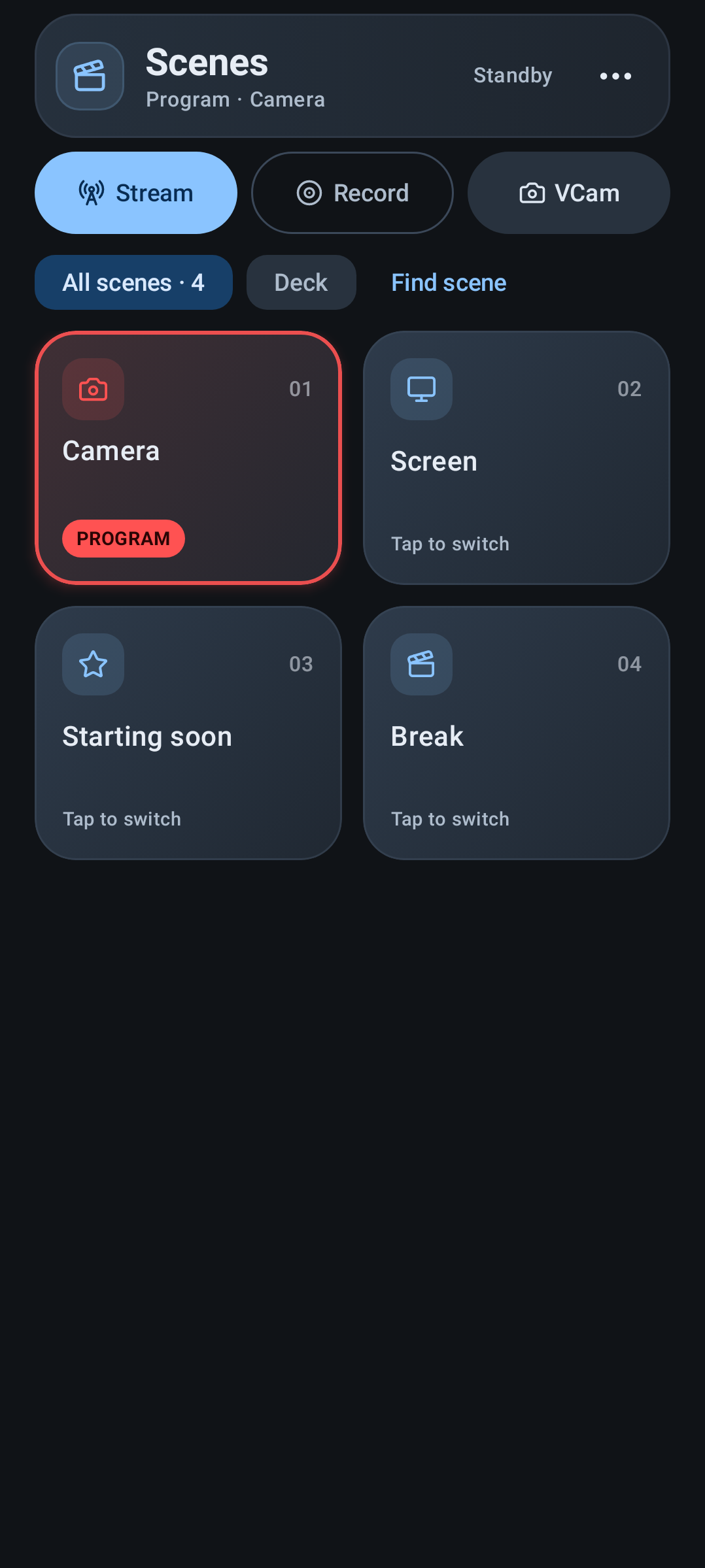
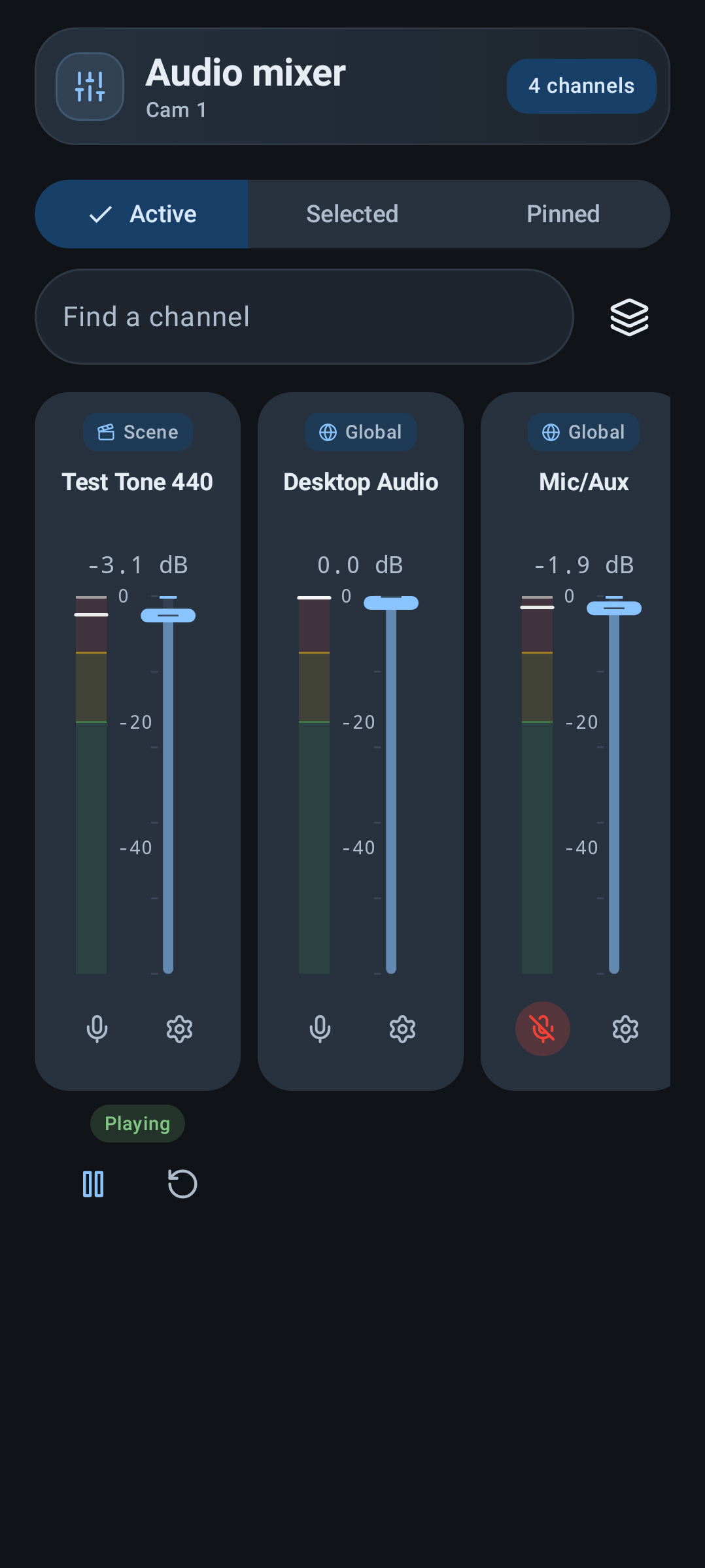
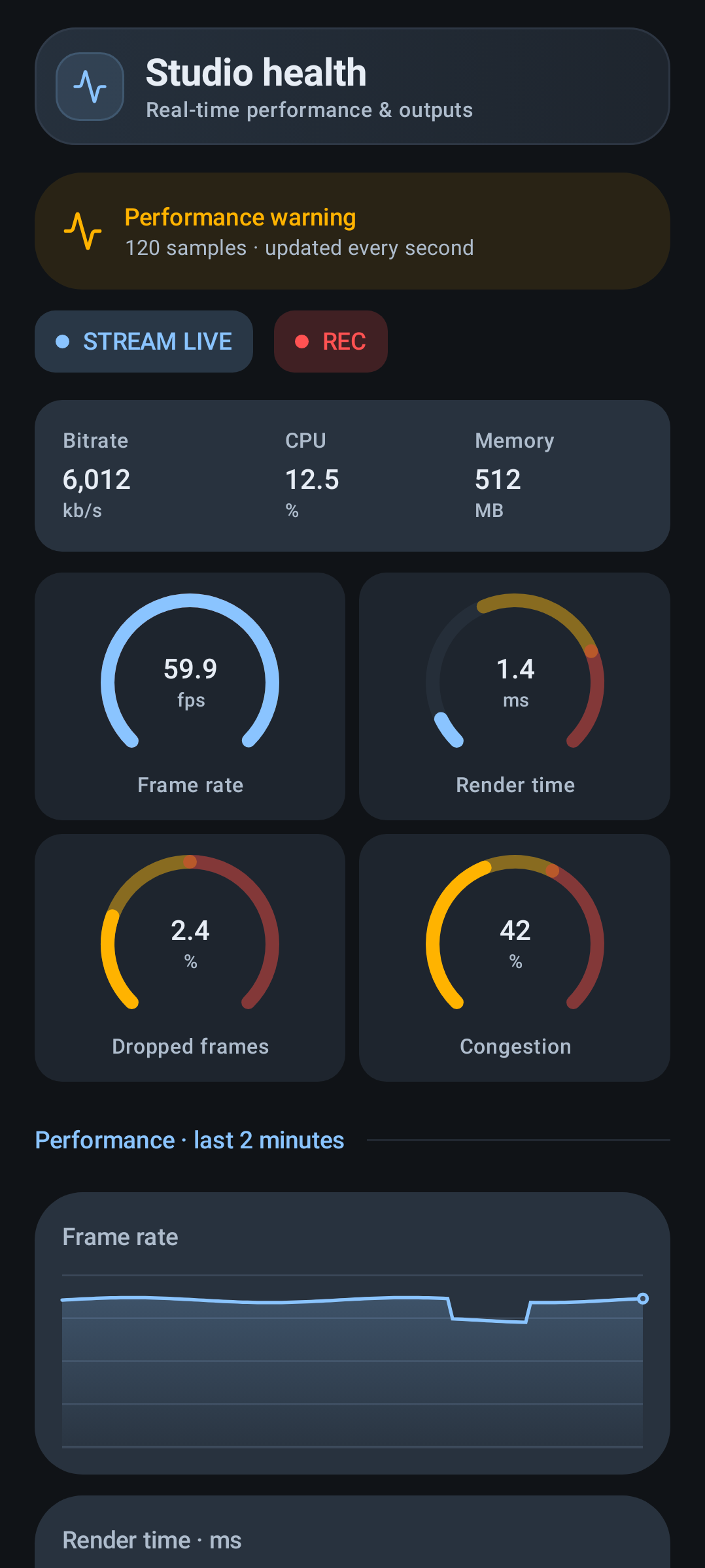
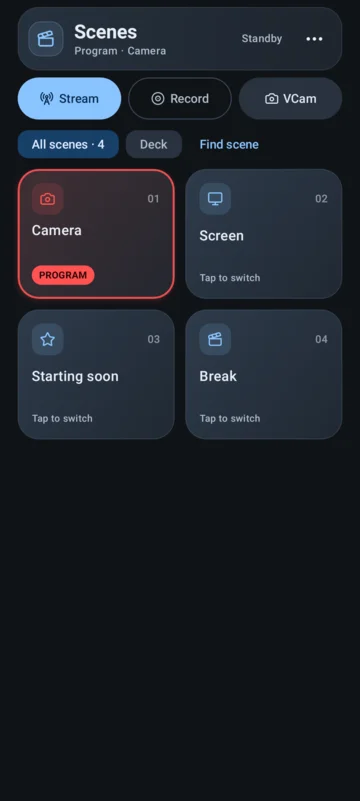
Application UI previews with representative OBS data.
Your OBS setup, in your hand
- Scene deck: switch scenes from a numbered grid, search, filter your Primary scenes, reorder cards, and choose local colors, icons and roles. Optional OBS screenshot previews show scene content.
- Studio Mode: select a preview scene, transition or cut to program, choose a transition and duration, or use the T-bar gesture.
- Mixer: adjust faders, mute channels and watch live meters across global, scene and nested audio sources. Lock sliders, pin a scope, or adjust balance, sync offset and monitoring.
- Outputs: start and stop streaming and recording, control the virtual camera, and choose confirmation settings. Persistent LIVE / REC indicators and separate timers show broadcast state.
- Stream health: watch FPS, bitrate, dropped frames, CPU, memory, render time and congestion, with gauges and a rolling two-minute history.
- Inventory & Doctor: curate scene roles locally, inspect the dependency graph, find stale entries and hierarchy issues, and import or export your registry as YAML.
-
Mobile extras: save multiple
connections, pair by QR code, reconnect automatically,
keep an optional background connection, and use a
home-screen widget for up to six Primary scenes.
Automation can switch scenes through
scenedeck://scene/{name}. - Fine controls: toggle source visibility and play, pause or restart media sources. Choose light, dark or system appearance, palettes, dynamic color, motion, haptics, density and keep-screen-on settings.
What you need
Android 9 or newer on a phone or tablet, and OBS Studio 28 or newer on a computer. Enable the built-in OBS WebSocket 5.x server. Your Android device must be able to reach that computer, normally over the same private network.
OBS captures, records and broadcasts on your computer. SceneDeck provides remote controls; scene curation stays local and preserves your OBS scene collection. Replay Buffer and OBS scene editing are outside the app’s current scope.
Install the Android app
-
Open
SceneDeck Android releases
on your device and download
scenedeck-android-release.apk. Choose the APK asset for installation; the AAB is a publishing bundle. - Open the downloaded APK. If Android asks, allow your browser or file manager to install unknown apps, then confirm installation.
- Open SceneDeck. You can turn off that installer permission again in Android settings after installing.
-
For updates, download and install a newer release
APK. Release notes and
SHA256SUMSare available on the release page.
Connect to OBS
- In OBS, open Tools → WebSocket Server Settings, enable the server and set a password. The default port is 4455.
- Connect your Android device to the same network. In SceneDeck, open More → Connections and add your computer’s local IP address, port and password, or scan an OBS connection QR code.
-
Test the connection, then connect. Allow the
WebSocket port through the computer’s firewall if
needed. On your phone, use the computer’s address
rather than
127.0.0.1. - Switch scenes, adjust audio, or start an output when ready. Being connected to OBS does not mean you are streaming.
Use a trusted private network: the normal OBS
ws:// connection is not encrypted. Saved
OBS passwords are encrypted on Android using
Keystore-backed storage.
Open source & privacy
Built with Kotlin and Jetpack Compose, under the MIT license. No SceneDeck account is required. Profiles, preferences and scene curation stay on your device; QR pairing uses Google ML Kit, which collects technical diagnostics.
Read the full privacy policy, explore the documentation and source build instructions, or get help through GitHub issues. SceneDeck is independent of the OBS Project.
obsctl-rsA Rust daemon, terminal dashboard and fast command-line remote in one binary.Rust View installation
obsctlA resilient OBS daemon, terminal interface and scriptable CLI built in Crystal.Crystal View installation
obs-statsSee GPU, encoder and network frame loss separately in a terminal dashboard.Rust View installation
twiRead and send Twitch chat from a focused terminal pane.Go View installation
ycFollow YouTube live chat with visible quota tracking and adaptive polling.Go View installation
multistream-managerPrepare Twitch and YouTube together, with chat and optional OBS controls in one terminal.Rust View installation
Your next stream,
under control.
Start with one tool. Build the setup that works for you.
Enable the connection
In OBS 28 or newer, open Tools → WebSocket Server Settings. Enable the server and set a password.
Pick your interface
A desktop remote, a terminal dashboard, or a scriptable CLI. Install the tool that fits your workflow.
Choose a toolMake it yours
Follow your tool’s connection instructions with your OBS host, port and password. Keep chat and platform setup in their own terminal panes.
Explore the repositoriesA few good
questions.
Do I need two machines?
No. The OBS control and monitoring tools also work with OBS on the
same computer. Connect to 127.0.0.1:4455. The chat
clients connect directly to Twitch or YouTube.
Which tool should I start with?
Choose SceneDeck for a Linux desktop remote, obsctl-rs for a terminal command center, or obs-stats to watch stream health. For your phone or tablet, choose SceneDeck Android. Every tool works independently; you do not need all eight.
Does msm start my stream?
Preparing your Twitch and YouTube broadcasts does not automatically start OBS. You choose when to go live. Current versions of msm also offer optional OBS controls, including starting and stopping your stream.
Is everything free and open source?
Yes. All eight tools are MIT licensed and developed in the open on GitHub. You can inspect the source, read an installer before running it, or download a prebuilt release.